
什麼時候需要這個功能?
| 情境 | 說明 |
|---|---|
| 多任務並行 | 需要同時處理多個任務 |
| 專人專事 | 不同任務需要不同記憶和能力的 agent |
怎麼跟 OpenClaw 說?
指令範例
幫我建立一個新的 agent 叫做 leader,可以透過 Telegram 跟 agent 溝通,先和你用一樣的模型,binding 到 group -100xxxxxxxxxx。
也可以定義他的角色:
指令範例
他角色是領導,負責溝通協調他底下的 developer, tester, reviewer,幫我寫到他的 agents.md, soul.md, identity.md
或者等 agent 部署好後,再到它專用的頻道告訴它。
取得 Telegram Group ID
步驟
步驟 1: 創建群組
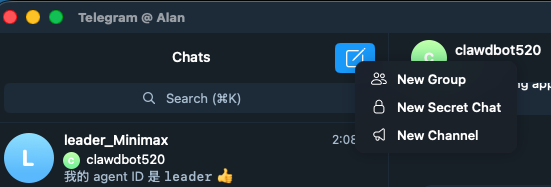
建立一個新的 Telegram 群組。
步驟 2: 加入 Bot
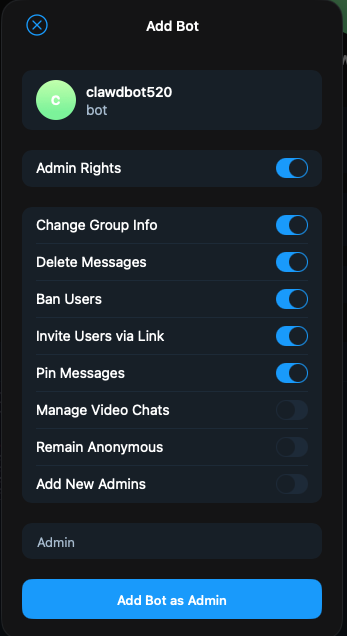
搜尋你的 bot 名稱,把 bot 加進去。
步驟 3: 設定 Admin

點擊右上角 edit,把 bot 設定成 admin。
步驟 4: 加入 Userinfo
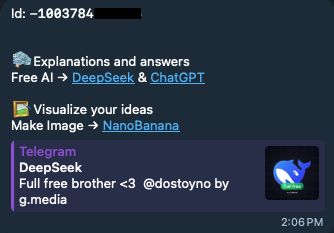
搜尋 userinfo 然後加入群組。
步驟 5: 取得 Group ID
加入後,在對話框詢問 group id。
檢查 OpenClaw 設定
重要
OpenClaw 沒有辦法第一次就做對,需要自己檢查
openclaw.json兩個地方:
1. channels.telegram.groups (Channel)
"groups": {
  "-100xxxxxxxxxx": {
    "enabled": true
  }
}
2. bindings.match (Binding)
"match": {
  "channel": "telegram",
  "peer": {
    "kind": "group",
    "id": "-100xxxxxxxxxx"
  }
}
配對 Agent
Step 1: 取得配對碼
在群組跟 agent 說話,它會給你一個 pairing code。
Step 2: 執行配對
openclaw pairing approve telegram JBTDB2A6Step 3: 開始使用
使用方式
- 在群組 @ 它才會回覆(這是 agent 隔離設計)
- 如果要在群聊中自動回覆,需修改設定
修改群組自動回覆
找到 mentions 把它拿掉:
"channels": {
  "telegram": {
    "enabled": true,
    "dmPolicy": "pairing",
    "groupPolicy": "open"  // 從 allowlist 改成 open
  }
}
進階設定
1. 兩個 Bot,分開聊
照前面步驟多開一個 bot,然後修改 openclaw.json:
"agents": {
  "list": [
    { "id": "main" },
    { "id": "main_bak" }  // 添加第二個 agent
  ]
}

"bindings": [
  {
    "match": { "channel": "telegram", "accountId": "bot_primary" },
    "agentId": "main"
  },
  {
    "match": { "channel": "telegram", "accountId": "bot_secondary" },
    "agentId": "main_bak"
  }
]

"channels": {
  "telegram": {
    "enabled": true,
    "dmPolicy": "pairing",
    "groupPolicy": "open",
    "accounts": {
      "bot_primary": {
        "botToken": "your-bot_token primary"
      },
      "bot_secondary": {
        "botToken": "your-bot_token secondary"
      }
    }
  }
}
2. 兩個 Bot,一起聊
"accounts": {
  "bot_primary": {
    "botToken": "your-bot_token primary",
    "groups": {
      "-100xxxxxxxxxx": {
        "requireMention": false,
        "enabled": true
      }
    }
  },
  "bot_secondary": {
    "botToken": "your-bot_token secondary",
    "groups": {
      "-100xxxxxxxxxx": {
        "requireMention": false,
        "enabled": true
      }
    }
  }
}
3. 一個 Bot,多個 Agents
限制
目前只有 WhatsApp 支援,Telegram 不支援。
相關連結
(完)